How to improve TV image quality: a simple setting to eliminate stuttering
Many users mistakenly blame the internet for video playback issues, while the root cause is a mismatch in frame rates.
 🎓Education
Photo: UNIAN
Key points
- Mismatch between 24 fps content and 60/120 Hz screens causes stuttering.
- The 'Match content frame rate' function automatically fixes the issue.
- Filmmaker mode helps avoid the 'soap opera effect'.
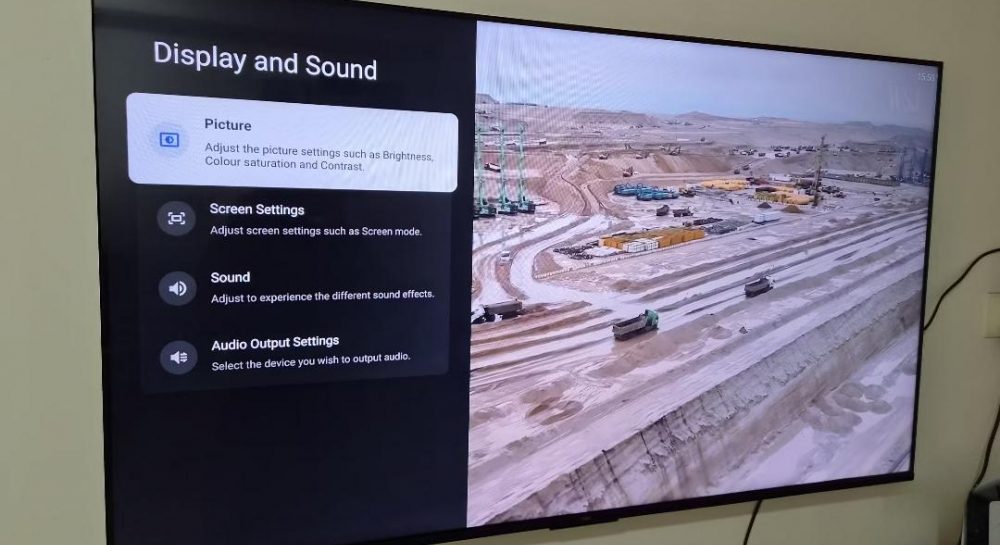
Many modern TV owners experience stuttering or "judder" effects while watching movies, often incorrectly attributing this to unstable internet connections. However, experts point out that the issue usually lies in a technical mismatch between the video content's frame rate and the screen's refresh rate settings.
Why stuttering occurs
Most movies are filmed at 24 frames per second, while modern TVs operate at 60 or 120 Hz. To adapt this content, devices use a 3:2 pulldown conversion, which creates an uneven rhythm. This is particularly noticeable during dynamic scenes or panning shots.
How to solve the problem
- Activate the "Match content frame rate" option in your display settings.
- Use the "Filmmaker" mode, which disables artificial motion smoothing that distorts the director's intent.
Once the frame rate matching feature is enabled, the TV automatically adjusts its screen refresh rate to match the source content, ensuring smooth playback without additional costs or hardware upgrades.
Source UNIAN — unian.ua/techno/gadgets/chomu-smikayetsya-zobrazhennya-na-televizor… ↗
Read next
 🏛️Politics
NABU and SAPO Leadership to Miss Temporary Investigative Commission Meeting Due to Foreign Trip
NABU Director Semen Kryvonos and SAPO Head Oleksandr Klymenko will not attend the Temporary Investigative Commission meeting on November 23 due to pre-planned foreign tri…
 🩺Health
Brain Health: Doctor Shares Key Habits to Prevent Dementia
Neurologist Oleh Taneiev explains how lifestyle adjustments, physical activity, and proper nutrition can help maintain cognitive health and lower the risk of dementia.
 🚨Events
Household secrets: why regular clothespins have two holes and how to use them correctly
Few people think about the design of familiar items, yet two holes on a clothespin serve important functions — from secure rope attachment to even fabric pressure distrib…
 🏙️City
New Legislative Tools Against Fraudulent Call Centers: First Results in Ukraine
A new article of the Criminal Code has come into force in Ukraine, significantly increasing penalties for organizing and operating fraudulent call centers.
 🏙️City
European Business Association urges Parliament to regulate business land rights
The EBA has reiterated its call for the Verkhovna Rada to pass bill No. 14087, aimed at resolving legal uncertainties for companies with foreign capital regarding non-agr…
 🚌Transport
EU and UK Pledge Unwavering Support for Ukraine and Enhanced Military Mobility
At their second summit in Brussels, the EU and the UK reaffirmed their strategic partnership and long-term commitment to supporting Ukraine's defense and security.